Showing posts with label gadget. Show all posts

Saturday, April 11, 2009

A Different Kind Of Book


Went to PC Fair today, man the place is jammed pack with people. However I don't want to comment much on the event, as this time round it is a quick operation for me. I just went there to buy a book and go home. Sounds weird huh buying books at PC Fair huh?

As pictured I did buy My Book but its is in actual fact an external hard disk drive. Specifically it's a Western Digital My Book Home Edition with 1 Terabytes of storage space. That's a whopping 1,000 Gigabytes; enough for 440 hours of DVD movies or 250,000 MP3 music files or 285,000 JPG photos. The fact figures are what is stated on the packaging box, but I'm sure everyone knows all is subject to type of compression and size of the media itself.

Like all gadgets I own, rarely will I buy something without doing "some" research on it. I choose this particular model for its multiple connection options (USB, Firewire & eSata) and auto power on/off function following your PC. The latter to me is a cool and practical functionality; one less thing to shut down and no need to worry of shutting down while the HDD is writing.


Package content includes (from left) the My Book ext HDD unit, USB cable, Firewire cable, power adapter and a quick install guide. Installing the My Book is very easy; just hook-up the data cable (I'm using Firewire for faster transfer speeds) and power cable, Windows will immediately identify the HDD and install automatically the driver. In Windows, you will see that the HDD is pre formated to FAT 32 and the total HDD space available is 931 GB.

This point forward I can use the HDD immediately just like another drive, but Western Digital also bundles some optional backup softwares (in the HDD itself); WD Anywhere Backup and Memeo Auto Sync. WD Anywhere Backup is basically a program which sort of mirror your PC content (content selectable) for backup, however it is not automated. So you would have to periodically remember to back up. The second software Memeo Auto Sync is very useful piece of software since it enables auto backup. Didn't install it as it is a trial version.


Design wise, I rather like it as it is sized similar to a paperback novel and it fits nicely on my book shelves (on the right of the monitor). Heat is not an issue as My Book has heat dissipation vents on top of its casing and a there is also a software (on your system tray) which monitors the HDD health and tempreture. The emitting lights at the front shall indicate accordingly; the HDD state whether the drive in use, on standby or power on/off.

Overall I'm satisfied with My Book; its form, practicality and price is well ballance. Snatched it at PC Fair for only RM399 and that works approximately 40 cents per Gig. Normal retail price is RM445 at Low Yat. Now I can download and store more stuff!! Should I temp you with this entry, its not too late as tomorrow is the last day for PC Fair if you want to grab it at this price. Cheers :)

Friday, April 10, 2009

PC Fair 2009 Opens Its Door Today


Dear boys and girls, today PC Fair 2009 opens its door. I'm rather excited to attend this time round as I've have a few things in mind to purchase, mostly PC necessities (ye ke ni ? >:D). However I'm currently bogged down at work unable to take half-day off; though of getting there early beating the crowd and grabbing the first offers.

OMG Friday prayers.. GTG.. will update this later! Anyhow, for those who had the opportunity to go during luch-time etc; just share some crazy offers if any :)

Wednesday, April 01, 2009

HP Mini 1000: Sweet Deal at Harvey Norman


If you've been eying a HP Mini 1000, now is a good time to buy as HP has reduced its price. from RM1,699 to RM1,499. Based on my observations through the web, there are 2 main reasons for the price slash:

1. Introduction of HP Mini 2140 early April (most likely during PC Fair 2009)
2. HP Mini 2140 will be priced at RM 1,699 >> same price as HP Mini 1000 (before price cut)

The swirly design on its case both contemporary and eye pleasing. A colleague of mine is currently using this Netbook and similarly to what I've said on HP Mini 2140; it's does the job well for office work, surfing and light multimedia. Only drawback is the absent of a VGA port which hinders you from using it for presentations.

The deficiency is easily fixed with HP optional VGA cable for this Netbook which retails at US$19.90. However if you really need VGA out; better opt for HP Mini 2140 as not only it has a VGA out, it also boast a larger and faster HDD, 3D HDD Protection and Expresscard Slot.

If you don't mind what HP Mini 1000 lacks, then by all means get this nice Netbook. Harvey Norman is selling it at RM1,499 with 2 free gifts which you can choose (Kesington Lock, USB hub, Optical Mouse, Screen Protector and etc) plus 50 pieces of blank DVD-Rs.

Sunday, March 22, 2009

My Very Own HP Mini (^-^)


At last, after a month and a half of constant internet monitoring.. I've finally got my hands on my very own HP Mini 2140. Been waiting for its arrival in Malaysia, but HP representative informed that it will only reach Malaysia by end of March or early April. Hence my main purpose of the recent trip to Singapore was to buy it from the Singapore IT Show 2009.

You might think, why to this extend this bloke would go and get this Netbook? Well.. I really needed something small and light for work; namely to check e-mails, simple document editing and do presentations. I've been hauling the office's 14 inch notebook and it is killing my back, to add insult.. the wireless didn't even work!

I chose this Netbook as it has an aluminum chassis, 92% full sized QWERTY keyboard, VGA out, large HDD (160 GB) and its minimalist design. But my other main deciding factor was the HP brand, which I fully trust on their excellent support (based on past experience). The only letdown for me is the power brick; which if the wires are all wound-up, its half the size of the Netbook itself :D It would be nice if they could do it like Dell's Mini 12 power brick, which is similar to a hand phone charger.

Anyhow, tt has been a week using the HP Mini 2140 and I'm glad to say that I am very pleased with its aesthetics and performance. It coped well with it intended purpose, which is web surfing, light office work, presentations and some multimedia playback. Setting your expectation right on Netbooks is crucial as "it is not a notebook" and people are going to get disappointed if you expect it to perform like one.

A little bit more details on the user experience; the system itself comes with Windows XP Home OS, on which I've installed Norton Internet Security and re-installed the MS Office 2007 (got enterprise license). In terms of protection and office work, everything performed well. Responsiveness of loading and editing large office files was nippy.

Web surfing on the other hand, Google Chrome is the fastest browser but IE7 which came second is my default browser. I choose IE7 as it is surprisingly fast to load, supports full screen browsing and it can be integrated with the Norton Internet Security password management. Both browsers loads and streamed multimmedia content well. Firefox on the other hand; crashed and loads very slowly, I've uninstalled it shortly.

Lastly in terms of multimedia; it played 16:9 DivX videos smoothly with perfect full screen display (without the letter box due to its resolution 1024x576). It also can play High Definition 720p and 1080 movies provided it is encoded in *.avi format. Matroska or *.mkv video simply a no no.. it jitters a lot and not watchable. I think the high compression level of Matroska is too much for the Atom processor.

Additionally apart from what I've described above; it is light at 1.2kg, well constructed and the battery lasts over 3 hours between charging. A good combo for any people who are constantly on the move. Nowadays, I carry it evrywhere in my trustee Crumpler :D Oh ya, bought the HP Mini at Singapore IT Show for approximately RM 1,850 (after tax rebate) which comes with free 2GB RAM upgrade and HP Slipcase.

Interested? Check out the upcoming PC fair in KL, should be here by then.


Sunday, March 15, 2009

Singapore IT Show 2009


The view today as I waited outside the hall 15 minutes prior to Singapore IT Show opening. This is my third consecutive time I've attended this event and it has become something I look forward every year.

It is sort of become; another excuse for a trip to Singapore :) But basically I like to attend the IT Show there as it showcases many new gadgets which some may or may not reach our shores. Last year it was on GPS navigation device, companies like HP, Packet Bell, Garmin and few other which I cannot recall; put forward their latest devices. Had a chance to test almost all of them!

This year I think belongs to LCD TV, huge companies like Samsung, Sony, LG, Panasonic, Harvey Norman and Courts are selling the televisions like an auction format and it all went like hotcakes. Best deal I've heard is two 40 inch LCD, Full HD was sold for the price of one by Courts. However this time also its a little bit crowded and noisy with the auction going on.

On cameras, Sony still offer the best deal. Even though it is a fraction cheaper than Malaysia, it really is still a good bargain. Why? Because they've bundled item like 8GB Memory Stick plus another 2 4GB Memory Stick, Leather Case, Sony Photo Printer, International warranty!! The freebies alone cost half of the camera cost if it's in Malaysia.

If you're into Dell Mini 10, the one locked with Maxis 3G in Malaysia; you can also purchase it here at an offer price of SG$699 (approx RM1690). If you have already subscribe to 3G data plan, just pop-in your sim card in this Netbook for wireless connectivity. LG and HP Mini 1011 also offers their own Netbook with 3G capabilities built in.

If you're into personal music, there are abundance of mid-to-high-end earphones to choose from. Senheiser, Sone, Audio-Technica, Panasonic and Creative just to name a few. Basically there are many things to see if you're a technology or gadget buff. I can keep rambling with a long list but I won't.

I just would like to recommend, if you have the opportunity; take a trip next year and see the IT Show for yourself! Signing off from Lion City :)

Thursday, March 12, 2009

iPhone Has Landed in Malaysia

After it's worldwide reveal in July 11th 2008, iPhone 3G has finally reached our shores. It will be offered by Maxis and will be officially available on 20th March 2009. The pricing and packages are already up at Maxis website, navigate there for details or pre-order one?

Tuesday, February 24, 2009

Affordable Full HD LCD Monitor Anyone?

If you are in the market for a new LCD monitor for your PC, perhaps you might want to consider the Dell S2409W, 24-inch Full HD LCD Monitor provided you have space on your computer desk. Being full HD; the native resolution for this monitor is 1920 x 1080, with the large desktop space it will easily fit 2 windows side by side.

16:9 aspect ratio will also provide that perfect HD video playback without that letterbox effect, 2 black horizontal lines on top and bottom of the movie. Apart from VGA and DVI connections, this moitor also fearues HDMI connector for higher quality digital connection.

Priced at only RM 699, I've stumbled upon this huge bargain while browsing Dell's website. After reading some reviews from the net and having an average user review of 4 out 5 stars (CNET, PC World, Dell) I honestly think this monitor truly gives the maximum bang for your money spent. Quote from CNET "Dell S2409W provides good quality for the money."

It may all sound good but one thing to consider in selecting any LCD monitor is the viewing angle. As mentioned in reviews; when viewed at an angle it darkens slightly however it is very crisps when viewed straight on the right angle. Despite of that, everything is reassuring when reading the user comments.

Therefore I was really tempted to get this monitor for myself but, I'm currently happy with my 22-inch Samsung 226BW LCD monitor. If you're interested, head fast to Dell's website as offer ends on 26th February 2009.

  • Full HD 1920 x 1080 resolution – Enjoy the latest movies and blockbusters in their highest resolution available.
  • 16:9 dynamic aspect ratio – Delivers a Full HD experience seamlessly.
  • HDMI – Rapid transfer of high quality video and audio in a pure uncompressed digital state for plug and play simplicity.
  • Sleek new design - The glossy black bezel complements most environments and most Dell systems.

Monday, February 16, 2009

HP Mini for the Ladies

While checking for HP Mini 2140 availability at HP Malaysia Online Store, I've stumbled upon another version of the HP Mini 1000; the Viviene Tam edition. This model was release in the US a few weeks after the introduction of the Mini 1000 and retails at US$699 (appox RM 2,516), a difference of US$250 (approx RM 900) from the original Mini 1000 (US$449; approx RM 1,616).

However to my surprise, the Viviene Tam edition is relatively cheap in Malaysia at only RM 1,999 and the difference is not much with the original HP 1000 selling at RM 1,699. This may due to the fact, the Malaysian edition uses a normal HDD instead of the speedy and expensive solid state drive. All is not lost as with the normal HDD, you gain much more HDD space (60GB vs 16GB).

While the other specs are the same as an original Mini 1000, the exception with this edition is its exterior design; which is all splashed in red (including the keyboards) with floral design. and it comes with a design matching silk sleeve. In my opinion, it is a sweet looking Netbook for the ladies and nicely priced. Grab this Netbook fast if you're interested as HP does state 'limited edition'. Link to HP online store.


HP Mini 1000 (Viviene Tam Edition)

Windows XP Home Edition SP3; 1.6GHz Intel Atom N270; 1024MB DDR2 SDRAM 533MHz; 128MB Mobile Intel 945GM; 60GB Toshiba 4,200rpmdesign matching silk sleeve.


Photo source : various from the web.

Saturday, February 07, 2009

Drooling Over HP Mini

When HP introduced the HP Mini 1000 end of last year, I was impressed with its hip contemporary design. Being a Netbook understandably I've put my expectation for it's performance at a minimum and kept in mind that it was meant for surfing and light productivity on the go.

Nonetheless I've researched extensively on the web for its features and reviews. bwana and Dan Ankerman reviews really put the HP Mini into my serious consideration. It showed, how snappy the HP Mini was running productivity applications, web streaming and video playback.

So off to the store for physical evaluation and man, I fell in love with the look, built quality feel and it's lightness straight away. The Windows XP also performed surprisingly well with most of applications launched quite fast, videos played well, hibernates/shutdown/restart/launch Windows at an acceptable time.

Umm by the way I'm doing this tests at Harvey Norman and cheekily without shame asking the sales guy to key-in the password every time I hibernate/shutdown/restart/launch the Netbook. I especially like the large keyboard slapped end-to-end on the system, it's really comfortable and no learning curve is required to get used to.

The HP Mini 1000 does have its downside, with a smaller and slower HDD from other offerings in the market at 60GB 4200RPM and no VGA out (requires special cable). Despite these 2 minor set-backs, I was sold and ready for a purchase. RRP for the HP Mini is RM1,699.

Surveyed Harvey Norman, Digital Mall PJ and Low Yat Plaza; the best bargain from the lot is at Low Yat whereby at RM 1,700 (payment by credit card charges included), they upgrade the RAM to 2 GB and throw in 5 freebies (Mouse, USB Hub etc). Another company offers the same as above but with additional 160GB WD External HDD (worth RM175) at a total of RM 1,800.

To me the latter is the better offer even its priced higher, as I can easily sell the external HDD at RM 150 and get the system at only RM 1,650! However it was not meant to be get this Netbook on that day, the only new unit that they have, had a physical defect on the screen (probably someone poked it with a sharp object). Went for the first bargain without the external HDD, they on the other hand didn't have stock. Turns out their store manager was still on CNY holiday.

With a heavy heart, went home without my HP Mini. That night I've research some more re-run the video review and I've stumbled on something that got me really excited! It's a newer model of the HP Mini 2140. It's much more sleeker being in an aluminum chassis with PCI/54 Express card slot, 120 GB 160 GB 5400RPM HDD and VGA out.

The HP Mini 2140 was introduced in the US market early Jan 09 and it should arrive in Asia by mid-Feb 09 and as of yesterday it is just on sale in Singapore. Hopefully it will reach Malaysia by end of the moth or I'll drive down the there to get one. Actually it's a blessing in disguise that my purchase didn't went through for the HP Mini 1000 as I'm definitely would want the latter. For now I'm continuing to google everyday and joined forums to get the latest updates on its availability here.

HP Mini 1000

Windows XP Home Edition SP3; 1.6GHz Intel Atom N270; 1024MB DDR2 SDRAM 533MHz; 128MB Mobile Intel 945GM; 60GB Toshiba 4,200rpm.


HP Mini 2140

Windows XP Home SP2; 1.6GHz Intel Atom N270; 1024MB DDR2 SDRAM 800MHz; 224MB Mobile Intel GMA 950; 160GB Toshiba 5400rpm

Photo source : various from the web.

Sunday, December 21, 2008

Blog from anywhere with BlogPress

This is a test posting from my iPhone using BlogPress application.


So far this application is a jiffy to use. Everything is self explanatory and easy to use.

Previously I've posted an entry on my notebook also from iPhone but that is through the secret e-mail. Some key items such as labels and multiple photos support are mising from the e-mailing method.

By using BlogPress I can manage and edit posts, add labels, photos, and etc. Additional features which would make this application better are landscape authoring, spell check, geotag and url link. Other than that, this app really makes mobile blogging easier.

-- Post From My iPhone

Monday, December 15, 2008

Fwd: So Long My Friend

You have been a good pal to me and others you have touched. may you serve your new owner well; as well as you did to me and be treated as just. Thank you my shiny steed.

Sent from my iPhone

Tuesday, November 25, 2008

Item Arrived (^-^)

Haha.. Finally it arrived yesterday at 3.55pm.. So whats in the bag?


Its another packaging inside of it.. which..


Fast forwarding opening up the content you'll find this on top of the wrappings.. hmm.. whats that?


Yeazzaaa!! Finally, my very own iPhone 3G!!! My most anticipated gadget which I've want since it launched.


Been watching this phone since it was first introduced (iPhone 1st Gen), but was bummed with exclusivity offering tied to a service provider. Hacked version doesn't compel either as it would be difficult to do periodical updates.

However since the introduction of the 3G version, more and more of these phone flooding the market with officially unlocked versions and now with version 2.0 firmware which supports MS Exchange; I was very tempted and started "researching" for the last 2 1/2 weeks on my free time.

Since placing an order on eBay, made payment, received the tracking number; it was worth the effort and wait to get this phone. Never had I bough a phone that excites myself and half of the office; its like a mini Apple "unveiling" event.

Anyhow, just "played" around for a day now and I'm very pleased with it. It can't beat a full QWERTY keyboard of my previous phone, but overall its awesome :)

Saturday, November 22, 2008

iWonder What is Coming?

On Schedule Delivery : 24/11/08


*Updated 23/11/08 @ 9.55 am - Flight diverted to HK

Rescheduled delivery : 25/11/2008

Saturday, August 23, 2008

Momo Logitech Works With Windows Vista

Few months back I've treat myself with a gaming apparatus, Logitech Momo Force Feedback Wheel. Its an excuse for me to unwind and relax from work plus as a reward for milestones archived.

It's not an easy task to select this wheel as it quite old (long in market, since Windows 98) and there's a stream of incompatibilities discussions with Windows Vista in forums. Safe to estimate that 50% says it doesn't work and 50% said it works. Anyhow determined, I've boldly bought it with Collin McRae Dirt.

Exited, I've downloaded the latest driver and installed the game; hoping for instant action. Boy I was in a bind when I've discovered that the gas paddle was stuck all the way (full throttle) in the game. I've kept reinstalling the drivers, applying patches to the game but without avail till I've found a registry hack in Logitech's forum.

The registry hack was meant for something else, but heck I was desperate and willing to try anything to make it work. And guess what it does works :D I've finally had a proper go 3 hours after when I've initially started. The steering force feedback was was awesome and it feels and looks great. Paired with the realistic game of Dirt, I've was totally immense within the game.

Another note though for Windows Vista users, you also have to download the latest Collin McRae Dirt patch v1.2. There a vital fix which you require to load your saved gaming profile properly.

So there you go, if you're into driving simulation; the Logitech Momo is a great choice, plenty of fun, inexpensive (RM238) and it WORKS with Windows Vista. Collin McRae Dirt goes for RM119.

Wednesday, July 09, 2008

Free Trial from F-Secure

If you don't already have any sort of Antivirus installed in your PC, why not give F-Secure Internet Security 2008 a try. F-Secure is currently offering a free protection on till end of this year for PC and Mobile devices.

I have used both of the F-Secure products listed above and based on my experience; the PC based Antivirus or Internet Security from F-Secure has been good. Many of the viruses or malware has been detected, especially from neighboring thumbdrives and it doesn't use too much Windows resources as compared to Norton.

The mobile security I've tested on my symbian based phone, and I find it quite memory intensive and slows down you phone. But again, this was 2 years back when phones processing power and internal ROM is low.

So there you have it, I hope by sharing this links and serials; it helps to save some cost and beneficial for you. If interested, proceed to download and use the following serial number:

F-Secure Internet Security 2008
Download here : http://download.f-secure.com/estore/fs2008.exe
Subscription number : U5RB-7JL4-9AE2-J5ZZ-9RQR (Valid till 31st December 2008)

F-Secure Mobile Security
Download here : http://mobile.f-secure.com/
Subscription number : 0SE8-TEYH-95K4 (Valid till 31st December 2008)


p/s : Some additional info on F-Secure Antivirus Review

Wednesday, April 16, 2008

PC Fair 2008 Aftermath

PC Fair 2008 in Kuala Lumpur just passed over the weekend and its the usual scene. The place was overly crowded and not much of a showcase. Prices are cheap, but not much if compared to purchasing it at Low Yat Plaza on normal days. If it ain't urgent, just buy at the shop.

As I have a list of things to buy, this year I went for the fair 2 days in a row. Day 1 was on Friday, a working day and I can only go after office hours. Since there's not much time left till closing at 9pm; day 1 is dedicated to survey the products and prices. Oh! day 1 also is the day to buy cheap back issue magazines before they're sold out.

Day 2 on Saturday was for shopping!! This year really did the damage; bought some RAMs, antivirus softwares, power bricks and LCD monitors. Notice the 's', bought not 1 but 2 power bricks and LCD monitors. And the ridiculous layout and flow rule of the PC Fair from the year before is still there. I was puffing, huffing and stopped several times just to get out of the exhibition hall through the "designated exit".

This flow rule is to ensure that every hall is visited especially the main sponsors. Going 2 days straight, I find it very troublesome as I wanted to go to hall 4 out of 5. Exit also the same as mentioned, luckily there was the gurlfriend who helped me to carry the power bricks. In Singapore IT Fair, you are free to enter and exit at any of its entrance. Which makes it very practical if you suddenly decided to get that "item" that wanted directly in and out.

Oh well, as much I compare and complaint; I still go to Malaysia PC Fair and buy stuffs. It's a guy attraction thing I suppose, being around all those gadgets. Also we did bump into Shook and his brother at the fair.

p/s : My unluckiness hits twice as of today; One of the LCD monitor I've bought has a dead pixel, after getting a replacement yesterday' again there was also a dead pixel. Trying to get it changed again tomorrow.

Monday, April 14, 2008

Featured Item : Kani Snapshot Trekka Camera Bag


Regardless if you are a professional, amateur photographer or just an avid hobbyist; a camera system is your invested asset. Sometimes it is your pride and joy after saving money for couple of months just to make the purchase. Choosing the right bag is essential to keep your gear and gadgets well protected when on the move.

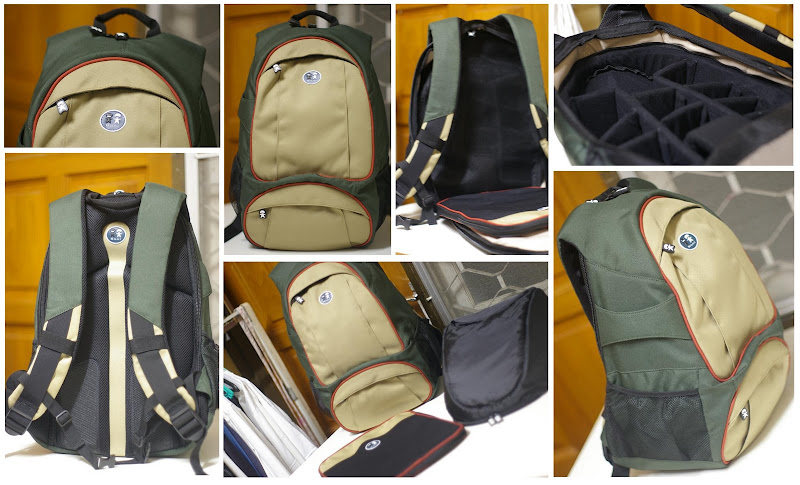
Featured item is Kani Snapshot Trekka SLR Backpack, model no BP01C-B06M. Kani is variant from Bagman which targets the Australian, China & Hong Kong market. It is among the favored brand name for the budget conscious. However the build quality and materials used are not compromised, it is at par with the leaders. I myself is a satisfied user of their notebook backpack and camera sling bag .

Although bag is designed for the photographers, the Snapshot Trekka is also a practical backpack for all your travelling or studying needs. The bag features an adjustable padded slots for camera equipment (multiple lenses, SLR camera) and a padded notebook slipcase (fits 14.1" widescreen notebook), both are detachable. With this flexibility of removing the compartments, at any one time you can use the bag to: carry both notebook & camera, carry notebook & luggage, camera only or luggage only.

Other than that, the bag comes with are 2 zipped pockets at the front, 2 side pockets and a slit on the side to a hook tripod. External dimension on the bag are 340 x 220 x 490 (mm). With this bag, you have everything you need to take the perfect shot.

Quick Facts on product features
  • Water repellent fabric
  • Uniquely designed foam-padded back to allow air flow with anti-slip pad
  • Heavy duty padded shoulder straps
  • Lower front zip pocket
  • Upper front organizational zip sleeve pocket
  • Detachable padded notebook case and camera case
  • Tripod hanger
Interested? Simply follow the pictured link under 'Items For Sale' on the right hand side of this page or go direct to my eBay listing. Purchasing or any questions on the bag can also be done via this blog. Thank you for looking.

Wednesday, April 09, 2008

PC Fair 2008


How time flies, I haven't written about the Singapore IT Show which I went to last month now comes along Malaysia's PC Fair 2008. To be more precise, this years PC Fair will be held at the same venue Kuala Lumpur Convention Center (for Klang Valley) and will commence this Friday till Sunday (11th - 13th April 2008).

The PC Fair which usually held twice a year; for past 3 years I've been at least once a year. The thing I look forward most to during a PC Fair are the cheap computing and technology back issues magazines. Other than that I do not bother to go if there isn't anything that I wish to purchase.

The reason I said it that way is because, PC Fair in Malaysia is quite bland, crowded and boring. Their modes operandi maintains the same every year without improvement to the exhibits. Everybody is selling the same thing and at a 'Promotional' price and there is introduction of new technology due to the minimal participation of big IT companies. For a change, I would very much like to see the latest gadgets, technology or even some prototypes for a peek to the future.

Oh well.. I don't see it happening any sooner. Even after saying that, I'm still going this year as I have a list of items to buy; software & hardware. Give me buzz if you're there also :)

Tuesday, April 01, 2008

Unexpected Find

I just love gadgets and handphones naturally tops the list. Since the introduction of Samsung Blackjack in the US (end 2006), I was captivated by its sleek design and the numerous connectivity options. I read loads of reviews and joined few forums just to know more on its features and get an insight as when will this smartphone arrive to our shores.

In the following year; early 2007, we had our first of tri-annual PC Fairs and I must say that the event marketing sure did it’s work as I found my way there 3 years in a row. I actually went to find a backpack for my (back then) new laptop, when I was unexpectedly lured to a Samsung booth. It was not due to the pretty Samsung Girls, but to something I’ve been craving for months; Yes! You’ve guess it right, the Blackjack!!

Over here evidently, they called it Samsung SGH-i600 and it bears one additional connectivity option which is WiFi on top of HSDPA and Bluetooth. I wasn’t expecting it to be here for at least a couple of months, in fact; I haven’t started saving for it. Package includes the phone, 2 batteries, 1Gb micro SD memory, Bluetooth earpiece and 18 months warranty; outside the event, package doesn’t comes with the Bluetooth earpiece which retails for RM150. I was hooked on the offer and swiped that good old credit card.

If memory serves me right that’s not the only damage of the day, apart from the phone, I’ve also purchased a backpack for my notebook, memory keys and notebook RAM; all "on offer". This frenzy sure cleaned my wallet for a few months. Currently the phone has been updated with Windows Mobile version 6 and working flawlessly. I heard that there is a new and improved model just launched and the event marketing has already sent out invites. Guess where I will be in 11th till 13th April 2008?


This entry is written for http://www.regonline.com

Wednesday, March 26, 2008

DIY Dry Box : Keep Your Gadgets Safe

Storing your camera or electronic gadgets properly is quite essential to avoid an unplanned trip to the servicing center. Your equipment is best stored in a cool and dry place to avoid:

1. Moisture – more often if your room is air-conditioned due to the condensations
2. Fungus - especially for camera lenses
3. Dust – if stored on an open shelve for example

The best place to avoid all these is to store your equipments in a dry box. There are many commercially available dry boxes in the market, but more often they are expensive.

A cheaper solution which I’m currently practicing is to use an air tight plastic container and put in a few silica gel inside which you can get from any good camera shop. The sachets type is quite hard to come by (unless you eat a lot of BinBin Rice Crackers; there's a small sachet inside), however the loose ones packed in a bigger bag is available at Photo Shangrila.

The container keeps the dusts away and silica gel acts as an agent that absorbs any moisture within the container. Now you’ve eliminated the 3 threats above and keep your equipments safe.

This plastic container has an air lock and a valve to withdraw air out once the lid is closed.
Inside: a few sachet type silica gels (these are not from BinBin :P). The blue padding is actually high density foam which you can get from a stationary store.

This plastic container on the other hand has a tray inside which is perfect to put the loose type silica gels.

There no step-by-step DIY guide here as it is fairly easy and mostly common sense. A good project to keep your gadgets safe and organized.